



Apple’s much-awaited iPhone 17 event has wrapped up, with the company confirming many of the rumours that had been circulating online. At its “Awe Dropping” event on Tuesday, September 9, Apple introduced the iPhone 17 series, the iPhone Air, and a few other devices. Alongside the hardware announcements, the company also announced that iOS 26 and iPadOS 26 will roll out to users on September 15.
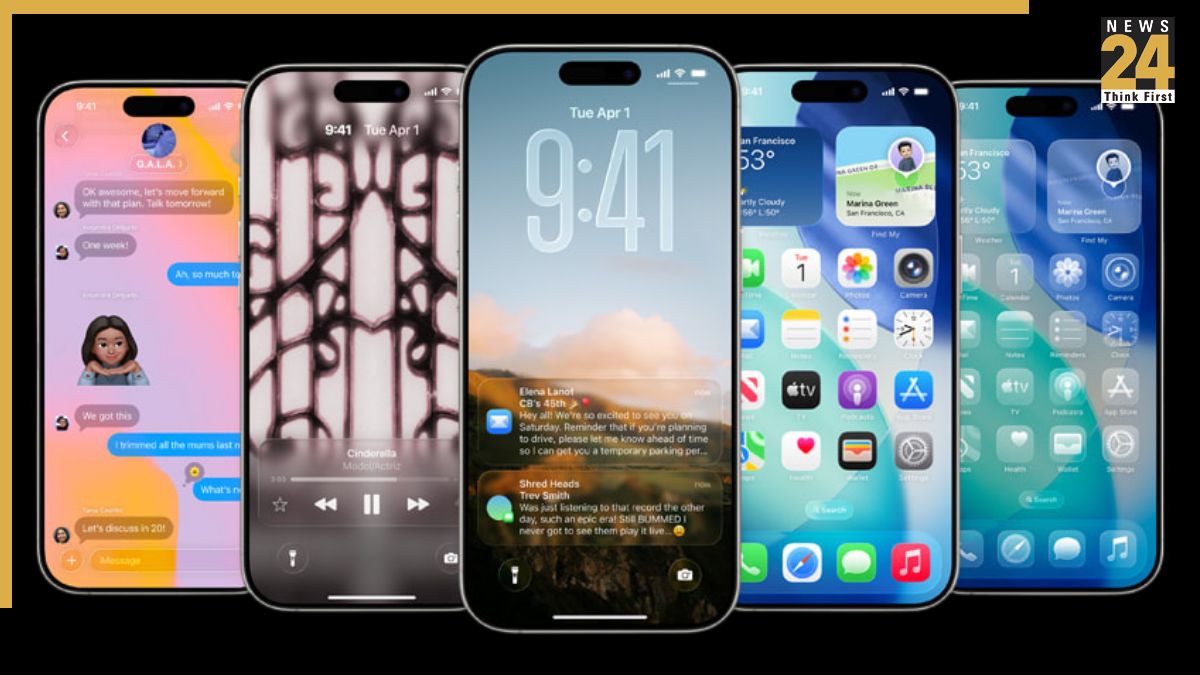
These OS updates also bring significant changes to the software on your iPhone and iPad. Have you heard about “Liquid Glass”? Some say it looks like Apple’s take on the old Windows Vista design. This is the most notable change.
Last year, Apple didn’t remove any iPhones from its list of supported devices, but the situation is different in 2025: some models will no longer be supported. All iPhone 8 models and the iPhone X were the last to be dropped in 2023, and this year, 2018 iPhones will no longer be supported. If your device isn’t compatible, you won’t be able to download iOS 26 next week.
iOS 18 iPhones That Won’t Be Compatible With iOS 26
- iPhone XR
- iPhone XS
- iPhone XS Max
iPhones Compatible With iOS 26
- iPhone SE (second generation or later)
- iPhone 11
- iPhone 11 Pro
- iPhone 11 Pro Max
- iPhone 12
- iPhone 12 mini
- iPhone 12 Pro
- iPhone 12 Pro Max
- iPhone 13
- iPhone 13 mini
- iPhone 13 Pro
- iPhone 13 Pro Max
- iPhone 14
- iPhone 14 Plus
- iPhone 14 Pro
- iPhone 14 Pro Max
- iPhone 15
- iPhone 15 Plus
- iPhone 15 Pro
- iPhone 15 Pro Max
- iPhone 16
- iPhone 16 Plus
- iPhone 16 Pro
- iPhone 16 Pro Max
- iPhone 16e
- iPhone 17
- iPhone 17 Air
- iPhone 17 Pro
- iPhone 17 Pro Max
iPads Compatible With iPadOS 26
- iPad Pro (M4)
- iPad Pro 12.9‑inch (3rd generation and later)
- iPad Pro 11‑inch (1st generation and later)
- iPad Air (3rd generation and later, including M2 and M3)
- iPad (8th generation and later, including A16)
- iPad mini (5th generation and later, including A17 Pro)
iOS 26 Features
Liquid Glass Design: Your home screen will be redesigned with new app icons, a dark mode, and more options. Buttons will also feature a modern, fluid design. According to Apple, Liquid Glass will make the interface across all Apple operating systems more consistent.
New Phone App Design: You can now view your contacts, call history, and voicemails on a single screen. The new “Hold Assis” feature notifies you when someone is on the phone, eliminating annoying elevator music.
Live Translation: With iOS 26, you can communicate with people in other languages via phone or text message. The feature translates your conversations in real time.
Polls: You can create polls in group chats in the Messages app. This helps avoid unnecessary back-and-forth messaging, such as when deciding on a restaurant for the weekend.
New Lock Screen Options: iOS 26 offers more ways to personalise your lock screen: a more attractive clock, 3D wallpaper effects, more widgets, and enhanced Focus Mode options.
Customizable Alarm Clock: You can set the alarm snooze time from 1 to 15 minutes, instead of the fixed 9-minute interval.
Improved Camera: The iOS 26 camera app is more intuitive and streamlined. All features are optimally positioned. A new feature also alerts you when the camera lens is dirty.
Screenshot revamps: When you take a screenshot, you’ll have the option to search for the image on Google (maybe you’re looking for a dress you saw on a celeb) and you can ask ChatGPT questions about the photo – all from the edit screen. It’s like an image search but without all the hard work.
ALSO READ: iPhone Air, Thinnest iPhone Ever, Debuts At Apple Event 2025 – Check Price, Specs & Features