

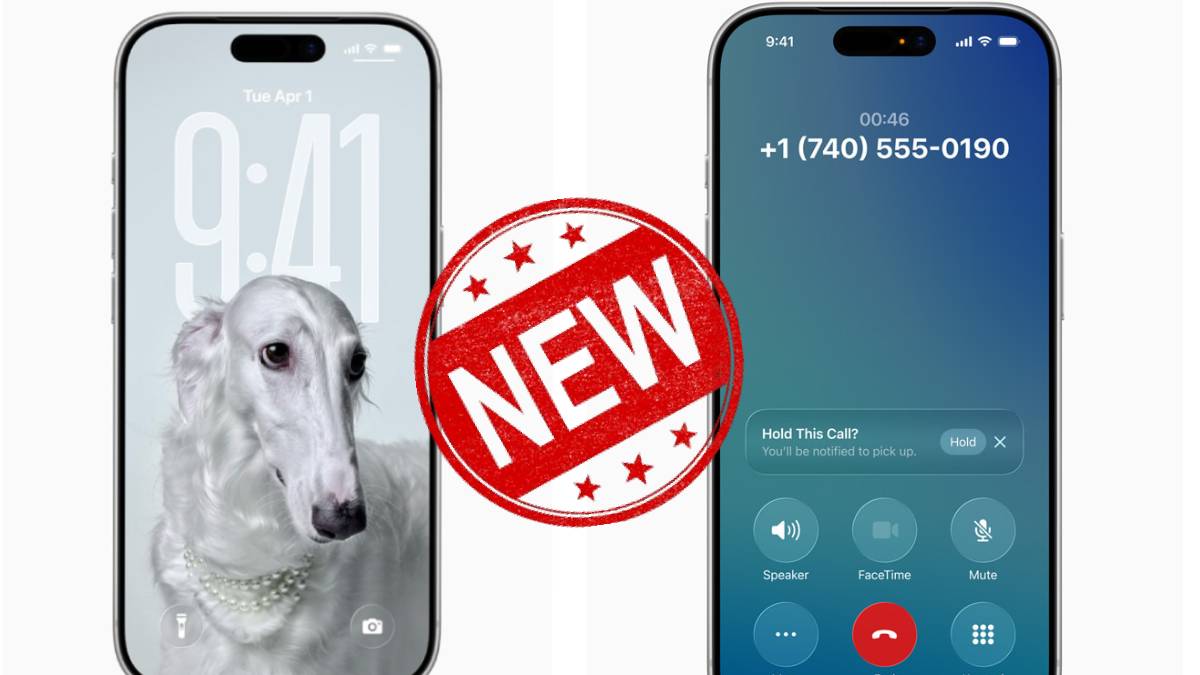


The new Liquid Glass interface is the biggest change introduced by iOS 26. The new look was showcased at WWDC 2025. If you work within the Apple ecosystem, the unified interface will help you feel familiar with the new design, no matter which device you use to execute tasks. Apple will be bringing this unified interface to all of its devices within the next year.
Apple’s New Liquid Glass Design
As revealed by users, existing wallpapers have, in most cases, been changed into spatial images where the main subject pops out from the background, and the icons are surrounded by a soft border. This will be a particularly welcome feature since many users use their own photos as their display background. Locking your phone will reveal more translucent menus that appear when you press and hold an app icon. All other application icons are translucent as well.
The Control Center is translucent as well, and Apple tries to make the different functions distinguishable by manipulating the translucency of the icons.
The icons also get a slight tweak in iOS 26, with shifting gradients and a few changes to visual elements. The changes to the icons are gradual, which I argue is a good thing.
Apple Intelligence
According to media reports, Apple Intelligence takes a backseat to the Liquid Glass improvements. The new changes fail to deliver sweeping transformations. However, iOS 26 does come with a slew of new AI intelligence capabilities-if you have a phone capable of supporting them. The Shortcuts app now incorporates AI-powered automations involving writing tools and Image Playground. Speaking of that image generation tool, it gains the ability to change the expressions of people in the animations you create, and it now has ChatGPT integration to expand the visual styles that result from the prompts.
New Gennmoji & Image Playground: Genmoji now lets users combine emojis into new creations and customize appearances. The reviewer finds these tools less practically useful unless you’re a power user. Beyond that, new changes have been made to bring in Visual Intelligence Enhancements that offer Visual Intelligence (introduced with iPhone 16), which now works with screenshots. Users will have the ability to unimage searches, create calendar events, translate text, and ask ChatGPT directly from screenshots. Here are a few other features that have been added with teh new update
Translation Features:
- On-the-fly translation added to Phone calls, FaceTime (not tested), and Messages for iPhone 15 Pro or later.
- AirPods Pro 3 support live translation, with upcoming firmware updates for other AirPods models.
- Translations work well but require pre-downloading language packs for smooth operation.
- Supported languages include English, French, German, Portuguese, Spanish (calls/FaceTime) plus Italian, Chinese, Japanese, Korean (Messages).
- The system translates unfiltered language, including swear words.
Phone Call Screening & Hold Assist:
- Call screening asks unknown callers to state their name/business before ringing.
- Works well to reduce robocalls and lets you mark contacts as known.
- Hold Assist can wait on hold for you and notify you when someone answers.
- These are available on older iPhones too (non-Apple Intelligence features).
Messages App Improvements:
- New group chat polls, Apple Cash payments in groups, and typing indicators.
- Unknown Senders filtering moves texts from non-contacts into a separate section, reducing spam interruptions.
- Background images can be added to message threads for personalization.
Photos App Updates:
- UI is split into Library and Collections tabs for easier navigation.
- More event-related info, like music links for concerts, has been added.
- Spatial photos can be created on iPhone 12+ with a 3D-like effect for lock screen use.
New iPhone Apps:
- Preview app brings Mac PDF reading/markup to iPhone.
- Games app centralizes game discovery, multiplayer challenges, and Apple Arcade promotion.
Existing Apps Enhancements:
- Music: Translations for sing-along, pin favorite artists/playlists, and AutoMix for smooth transitions.
- Reminders: Auto-create reminders from texts/emails, Control Center shortcut, and time zone support.
- Maps: Visited Places logs where you go for easy recall (beta), and preferred routes notify traffic issues.
- CarPlay: New widgets, clearer notifications, and quick message replies.
- AirPods: New control features, like using the stem to take photos/videos for H2-powered models.
Also Read: Gemini AI Saree Photos Trend: These Are the Best Prompts to try, But Police Warns of..